PNG creator: make transparent PNGs from any image
Upload a photo, logo, or drawing and download it with a transparent background — free, and without your file ever leaving your device.
Drop an image to get started
or paste one with Ctrl/⌘ V
PNG, JPG or WEBP · up to 20MB
What is a PNG creator?
A PNG creator turns an ordinary image into a PNG file whose background is transparent. PNG is one of the few common formats with an alpha channel, so it can store “see-through” pixels. The subject stays; everything around it disappears, so you can place it anywhere without a white box.
You need one whenever an image has to sit on top of something else: a logo on a dark website header, a product on a store's white page, a signature on a contract, or a sticker in a chat. A JPG always carries a rectangle of background with it; a transparent file lets the design underneath show through.
This transparent PNG maker is built on the same on-device AI as our background remover, tuned for the moment you just need a clean file. The model runs inside your browser, so your pictures are never uploaded, there is no queue, and it keeps working even if your connection drops once the page and model have loaded.
Examples
From photo to transparent PNG
Two real photos, turned into transparent images with this tool and left exactly as it produced them.
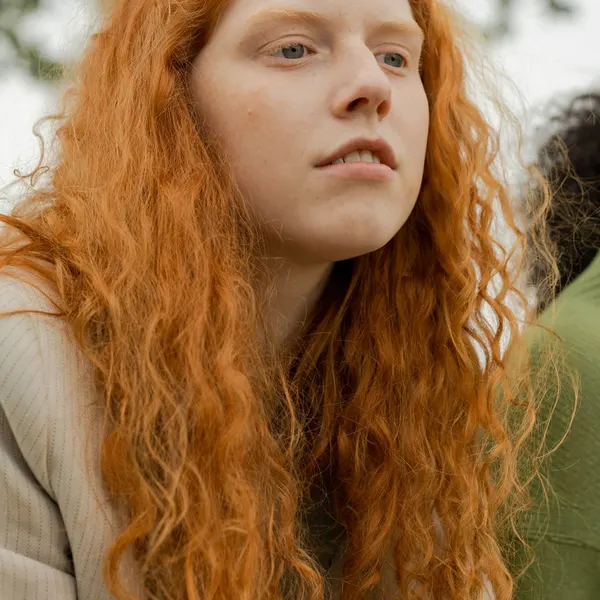 Before
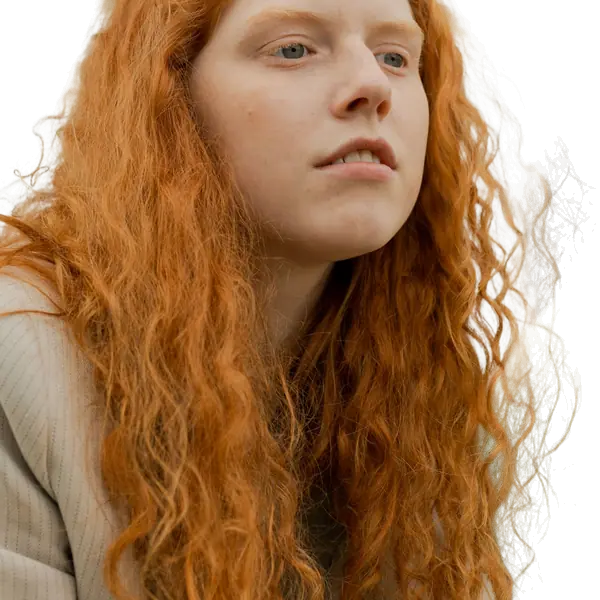 After
After Before
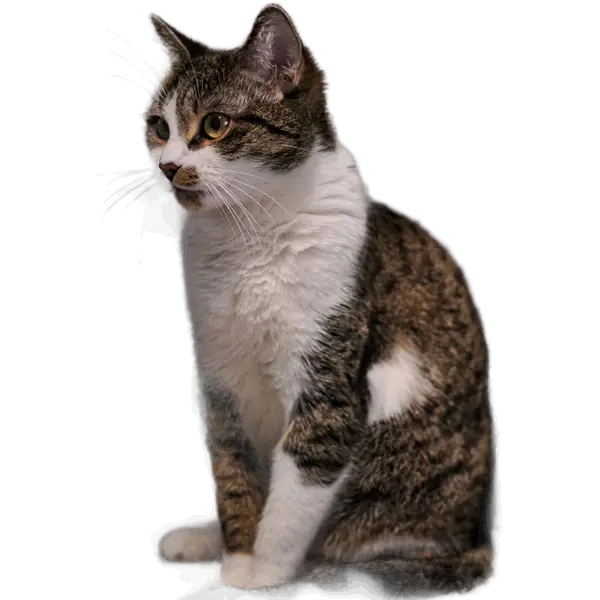 After
AfterSource photos from Pexels (Pexels License: free to use, no attribution required) by Ron Lach and Feyzullah Kilincarslan. How they were made: each original JPG (1600 px wide) was run once through the same ormbg model this site uses, at Balanced (16-bit) quality, with edge cleanup left at “As detected” and no brush edits. The before and after images were then given the identical crop and resized to fit this page. See every example with measured data.
How to create a transparent PNG in 3 steps
There is nothing to install and no account to create. The first image takes a little longer while the AI model loads into your browser; after that, each new picture is ready in a few seconds.
- 1
Upload an image to the PNG creator
Drop in a JPG, WEBP, or PNG up to 20MB, or paste a screenshot from your clipboard. Photos, scanned drawings, and logos on a white background all work.
- 2
The transparent PNG maker removes the background
An on-device AI model finds the subject and erases everything behind it. If it misses a detail, paint over the part you want to keep.
- 3
Download your transparent PNG
Save your PNG cutout with an alpha channel, at full resolution on a computer, ready to drop onto any color, pattern, or design.
What to make with a PNG creator
Logo PNG with a transparent background
Most logos arrive as JPGs with a white box around them. Convert yours into a transparent logo PNG that sits cleanly on dark headers, videos, and slides.
Sticker PNGs for chat and print
Cut out a pet, a face, or a doodle and export it as a sticker PNG for WhatsApp, Telegram, or Discord, or send it to a sticker printer.
Product PNGs for online stores
Turn product photos into transparent PNGs, then place them on white or a brand color so every listing on Amazon, Etsy, or Shopify looks consistent.
Transparent PNGs for presentations
A PNG cutout blends into PowerPoint, Keynote, and Google Slides far better than a rectangular photo, and it stays sharp when you resize it.
Signatures for documents and contracts
Sign a sheet of white paper, snap a photo, and turn it into a transparent signature image you can place on PDFs, invoices, and email footers.
Profile pictures and avatars
Cut yourself out of a busy photo and drop the portrait onto a solid color or gradient for LinkedIn, Slack, a team page, or a gaming avatar.
PNG, WEBP, or JPG: which format to download
Every cutout can be saved in three formats. Transparency only survives in two of them, so choose based on where the image is going next.
PNG
Lossless, with full transparency. The best choice for logos, stickers, signatures, and anything you will layer over another design. Files are larger than JPG.
WEBP
Also supports transparency, at a noticeably smaller file size. Great for websites and online stores, though some older desktop apps can't open it.
JPG
No transparency at all — empty areas are filled with a solid color. Pick it when you want a white or colored background and the smallest possible file.
From flat graphic to design-ready source file
The background remover is built around photos: a person, a pet, or a product that ends up on a new background. The PNG creator is for the other half of the job, when the image is a graphic that has to go into another program: a logo that only exists as a JPG with a white box, a signature or sketch scanned from paper, an icon cropped from a screenshot, or clip art saved on a white page.
Those images need a different finish. Instead of a background color and a marketplace size, they need a clean transparent edge, the original pixel dimensions, and a lossless file that design software can layer, recolor around, and resize down without artifacts. That is why PNG is the default here, and why it pays to check the result on a dark preview: a faint white fringe that is invisible on paper shows up the moment the graphic sits on a dark header.
A workflow for flat artwork
- Start from the largest version you have: a scan at 300 DPI or a full-size export beats a thumbnail copied from a web page.
- For logos made of separate pieces (an icon beside a wordmark), use Select object and paint over every piece, so nothing is dropped.
- Check holes in letters such as O, A, and B on the black preview. If they are still filled, tighten the edge by a pixel or two in Settings.
- Download a PNG and keep it as your master. Make WEBP or JPG copies from it later, never the other way round.
Opening the PNG in your design software
- Canva
- Upload the PNG under Uploads and drag it onto the design. It sits directly on your background, and Canva's shadow effects follow the cut edge, not the rectangle.
- Figma
- Drag the PNG onto the canvas. Add a drop shadow to the layer, or use the cutout as a mask to fill the silhouette with a gradient or texture.
- Photoshop, Affinity, GIMP
- Place the PNG as a layer, then create a layer mask from its transparency so you can fine-tune the edge non-destructively.
- PowerPoint, Keynote, Google Slides
- Insert the file as a picture rather than pasting from another app: some clipboard routes flatten transparency to white.
- Cricut, Silhouette
- Upload the PNG; the transparent edge becomes the cut line. Add an offset border so fine hair or fur turns into a clean, cuttable outline.
The bottom line: use the background remover when the photo is the finished product, and the PNG creator when the cutout is an ingredient for something you will design next. If you need a logo for large-format print or embroidery, ask for the original vector file instead; a PNG cannot be enlarged beyond its pixels.
What the Settings panel changes in your PNG
Three settings affect the transparent edge of your file. Here is what each one actually does, with numbers from our tests on six real photos.
- Model quality (8-bit, 16-bit, full precision)
- The same model stored at different precision. In our tests the default 8-bit model ran about 36% faster than full precision on a CPU, and its mask differed visibly on at most 0.606% of pixels, almost all in fine hair and in glass. The 16-bit model matched full precision almost exactly. For logos, signatures, and other flat graphics, the default is all you need.
- Edge cleanup (Tighter / Wider, up to 10 px)
- Shrinks or grows the transparent edge after the AI has run, without running it again. Tighter by 1 to 2 px removes a pale fringe left by white paper or a white logo box; Wider by 2 to 4 px brings back thin pen strokes or the tip of a serif that was clipped. Larger values are rarely needed for graphics and start to visibly thin or thicken lettering.
- Processor (CPU / WASM or GPU / WebGPU)
- Changes speed, not the result. WebAssembly on the CPU is the default and works everywhere; WebGPU can be faster on a computer with a good graphics card and falls back to the CPU if it is unavailable. Phones always use the CPU and the 8-bit model.
Tips for a cleaner transparent image
Pick a photo with a clear subject
The AI works best when the person, product, or object is in focus and takes up a good part of the frame. A tiny subject in a wide shot leaves less detail to work with.
Contrast makes cleaner edges
A dark object on a light wall, or a bright logo on a dark backdrop, gives the model an easy boundary to follow, so the image cutout needs little or no touch-up.
Crop to one subject first
If a picture contains several people or items, crop it to the one you want before removing the background. The model then focuses on the right thing.
Paint back anything that went missing
When a thin strap, a pen, or a bit of hair gets dropped, switch to the select tool and paint over it to keep that area in the final file.
Check the edges on a dark and a light color
Before downloading, preview the cutout on both a dark and a light background color. Leftover halos or stray pixels that hide on one usually show up on the other.
Start from the largest original you have
On a computer the download keeps your original resolution, so a sharp, high-resolution source gives you a transparent image that still looks crisp when printed or enlarged. For print-size files, use a laptop or desktop rather than a phone.
Guides for transparent PNGs
All guides →- Design & file formatsHow to make a transparent PNG of a logo or a handwritten signatureTurn a logo on a white box or a signature on paper into a clean transparent PNG: scanning and photo tips, fixing gray paper, keeping thin strokes, and when you really need a vector file.
- Design & file formatsPNG vs WEBP vs JPG for cutouts: which format keeps transparencyHow each image format stores (or loses) transparency, real-world file size trade-offs, compatibility with marketplaces and apps, and a simple rule for choosing an export format.
- Design & file formatsUsing transparent cutouts in Canva, Figma, Photoshop, PowerPoint, and CricutHow to bring a transparent PNG into common design and office apps without losing the transparency, plus layering, shadows, outlines, and print-and-cut tips.
- Design & file formatsCutting out people and objects from screenshots and video framesHow to lift a person, a product, or an icon out of a screenshot or a paused video by pasting it straight into the tool, plus the resolution and copyright limits to keep in mind.
- How it worksFixing halos, missing parts, and rough edges in a cutoutA troubleshooting guide for imperfect cutouts: halos of the old background, clipped fingers and straps, the wrong subject, holes that should be transparent, and jagged or blocky edges.
- Design & file formatsHow to reduce image file size for uploads (and work within a 20MB limit)Why cutout files get large, what actually controls file size (pixels, format, quality), how to fit marketplace and email limits, and how to prepare very large camera photos.
PNG creator FAQ
Can I make a transparent PNG from a JPG?
Yes. A JPG can't store transparency, so the background is removed first and the result is saved in PNG format with an alpha channel.
What's the difference between a PNG maker and a background remover?
They do the same job from different angles: a background remover erases what's behind the subject, and a PNG maker saves that cutout in a format that keeps the transparency, ready to use as an ingredient in another design.
Why is the inside of a letter in my logo still white?
Enclosed holes, like the middle of an O or an A, are easy for the model to treat as part of the logo. Move the edge slider in Settings toward Tighter by one or two pixels, or reselect the logo more tightly with Select object, then check the result on the black preview.
My logo is made of separate pieces and one went missing. What do I do?
The model looks for one main subject, so an icon next to a wordmark can lose a piece. Use Select object and paint over every piece you want to keep, or draw a loop around the whole logo; the AI then re-runs on just that selection.
Will my image lose quality?
Not on a computer: the file is exported at the same width and height as your original, and PNG is a lossless format, so the subject looks exactly as sharp as it did in the source image. On phones and low-memory devices, photos larger than about 4 megapixels are scaled down before processing to avoid running out of memory.
Why is my PNG so much bigger than a JPG?
PNG is lossless, so detailed areas such as hair and fur compress poorly. In our tests on six full-size cutouts, the PNG was about 6 to 11 times larger than the WEBP version. If you need transparency on a website, export WEBP; keep the PNG as your master copy.
What print size or DPI will my PNG have?
A PNG stores pixels, not a physical size. Set the print size in the app where you place it: at 300 DPI, a 1500-pixel-wide cutout prints about 5 inches (12.7 cm) wide. For sharp prints, start from the largest original you have and process it on a computer.
Does the transparency survive in Word, PowerPoint, or Google Slides?
Yes, when you insert the PNG file as a picture. Copying and pasting through the clipboard from another app can sometimes flatten transparency to white, so insert the file directly.
Can I make a PNG from a screenshot?
Yes. Copy a screenshot and paste it straight into the upload area with Ctrl+V or Cmd+V. It's a quick way to lift a chart, an icon, or a person out of a slide or video frame without saving the screenshot first.
What kinds of images work best?
Photos of people, pets, products, cars, and furniture, plus logos and drawings on a plain background. Scenes without a clear main subject, such as a landscape or a crowded street, are much harder to cut out cleanly.
Need to remove the background from a photo for other uses? Try the free background remover.