Bulk background remover for whole batches of product photos
This bulk background remover turns a folder of product shots into marketplace-ready images on white, sized for Amazon, Shopify, eBay, or Etsy, and downloads them as one ZIP. Free, and your photos never leave your device.
Drop product photos or a whole folder
Up to 100 images per batch, processed one after another on your device
PNG, JPG or WEBP · up to 20MB each
Examples
Product photos before and after the background remover
Two real product photos run through the same AI this page uses. Each image cutout is the tool's untouched output; in the bulk tool it would then be centered on white, a color, or your backdrop.
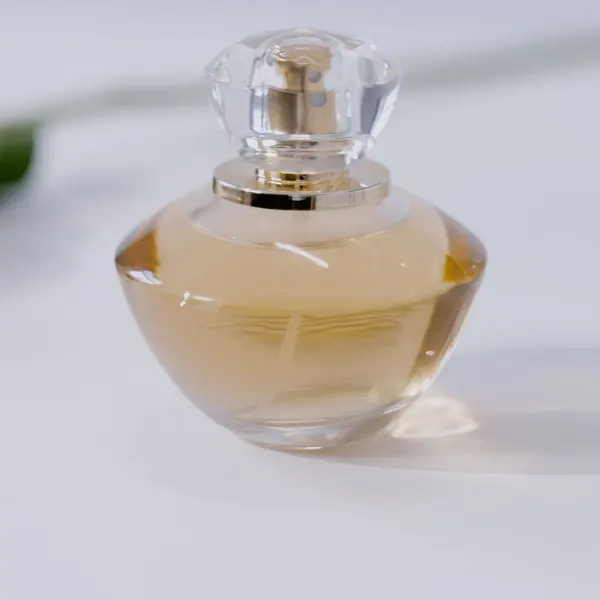 Before
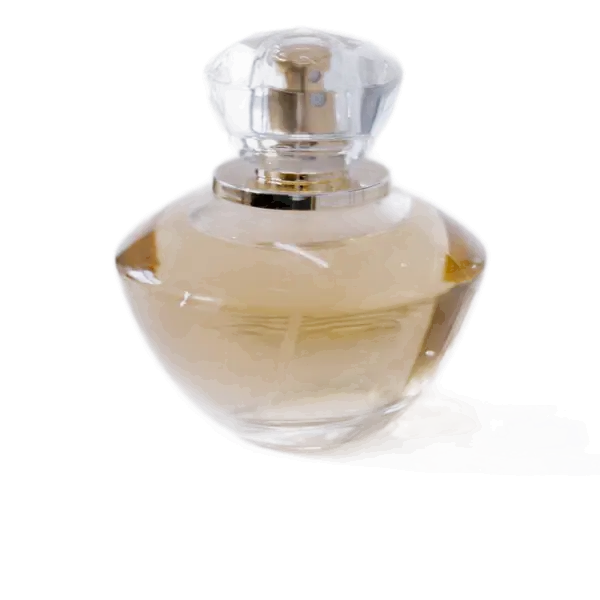 After
After Before
 After
AfterSource photos from Pexels (Pexels License: free to use, no attribution required) by MART PRODUCTION and cottonbro studio. How they were made: each original JPG (1600 px wide) was run once through the same ormbg model this site uses, at Balanced (16-bit) quality, with edge cleanup left at “As detected” and no brush edits. The before and after images were then given the identical crop and resized to fit this page. See every example with measured data.
How to remove background from multiple images with a batch background remover
- 1
Drop in your product photos
Choose JPG, PNG, or WEBP files, or drop in a folder. The AI background remover cuts them out one after another while you keep working.
- 2
Pick a marketplace and a look
Choose Amazon, Shopify, eBay, Etsy, or a custom size. Every product is centered at a consistent size, on white, a color, a gradient, or a backdrop you upload.
- 3
Download everything as a ZIP
Export all images in one ZIP, named the way your store expects, and compressed to fit the platform's file-size limit.
Bulk remove background from a whole folder of product images
Instead of feeding a bulk image background remover one photo at a time, drop in an entire folder from your camera, your supplier, or last week's product shoot. Every JPG, PNG, and WEBP inside is added, up to 100 per batch, and anything that isn't an image is skipped. Files are sorted by name, so SKU-2 comes before SKU-10 and the export keeps your catalog order. Each photo is processed on your computer, never on a server, and the finished set arrives as one ZIP with every file already named by your template, ready for a bulk upload to your store.
Built for online sellers
Everything between “photos off the camera” and “ready to upload”, in one pass. For a single image with brush touch-ups and cropping, use our free background remover.
Marketplace-ready sizes
Presets for Amazon, Shopify, eBay, Etsy, Taobao, Instagram, and Xiaohongshu, each with the size and background that marketplace expects, or type any width and height.
Consistent product framing
Each product is detected, trimmed, and sized to match the rest, so an entire catalog lines up neatly in your store grid.
Natural shadows
Add a ground shadow, a soft drop shadow, or a mirror reflection, so products don't look like they're floating on a flat white page.
Backgrounds beyond white
Use white, light gray, any brand color, studio and tabletop gradients, or upload a lifestyle backdrop of your choice.
File-size limits handled
Set a maximum size in KB and JPG or WEBP quality is lowered automatically, only as far as each image needs.
Rename in bulk
Name files with a template such as {name}-white or SKU-{n}, so the export is ready to upload without renaming anything by hand.
Tips for cleaner results from a bulk background remover
A few minutes of care at the photo shoot saves touch-ups across the whole batch.
Shoot on a plain, contrasting surface
A light product on a darker table, or a dark one on white paper, gives the background remover a clear edge to follow. Busy patterns and matching colors are where edges get fuzzy.
Keep props out of the frame
The AI keeps everything it sees as foreground, so a tag, a hand, or a second item stays in the cutout. Amazon doesn't allow props in main images, so remove them before you shoot.
Use one angle and distance for the batch
The tool centers every product at the same size, but it can't change perspective. Photos taken from the same height and angle end up looking like one consistent set.
Check glass, jewelry, and shiny items
Transparent and reflective products are the hardest for any background remover. Open those images and use the edge slider, or touch them up one at a time with the brush tool on the single-image page.
Product photo guides
All guides →- Online sellingA bulk workflow for product photos: batch cutouts, naming, and ZIP exportHow to process a whole folder of product photos in one pass: consistent framing, file naming templates for SKUs, fixing single images without redoing the batch, and exporting one ZIP.
- Online sellingHow to make Amazon main images with a pure white backgroundWhat Amazon's main image rules actually require (RGB 255 white, 85% fill, 1000px+ for zoom), why phone photos fail them, and a repeatable workflow to fix a whole catalog.
- Online sellingProduct photo sizes and backgrounds for Amazon, Shopify, eBay, and EtsyA side-by-side reference of image size, aspect ratio, background, and file rules for the major marketplaces, plus how to export one set of photos for several stores without reshooting.
- Online sellingAdding natural shadows to product cutoutsWhy products look like they are floating after the background is removed, the four shadow styles (none, ground, soft, reflection) and when to use each, and how to keep shadows marketplace-compliant.
- Online sellingHow to shoot product photos for clean cutouts (with just a phone)A simple home setup for product photos that cut out cleanly: backdrop color, window light, camera distance, and special care for glass, jewelry, and shiny items.
- Design & file formatsHow to reduce image file size for uploads (and work within a 20MB limit)Why cutout files get large, what actually controls file size (pixels, format, quality), how to fit marketplace and email limits, and how to prepare very large camera photos.
Bulk background remover FAQ
How many images can I process at once?
Up to 100 images per batch, each up to 20MB. They are processed one at a time so the page stays responsive; when a batch finishes you can add more.
Do the images meet Amazon product photo requirements?
The Amazon preset exports a 2000×2000 JPG on pure white (RGB 255, 255, 255) with the product filling about 85% of the frame, which matches Amazon's main image guidelines. Always check the result for leftover props or text, which Amazon doesn't allow.
How do I make white background product photos in bulk?
Pick the Amazon or eBay preset, or choose the white swatch under Background. Every photo is placed on pure white (#FFFFFF) with even margins, so your white background product photos match across the catalog. If products look like they're floating, add the Ground or Soft shadow.
Can I prepare a whole Shopify or eBay catalog in one batch?
Yes. Choose the Shopify preset for 2048×2048 square images or the eBay preset for 1600×1600 on white, then add your photos. Name the export with a template such as SKU-{n} so files line up with your product list, and set a maximum file size if your import tool has one. For bigger catalogs, download the ZIP, clear the batch, and run the next 100.
Can I use it for Etsy listing photos?
Yes. The Etsy preset exports 2000×1500 images in a 4:3 landscape shape that suits Etsy's listing thumbnails, with every product centered at the same size. For a handmade or boutique look, swap plain white for the Tabletop or Warm sand background, or upload your own backdrop, so every Etsy listing photo in your shop stays consistent.
Are my product photos uploaded anywhere?
No. The background remover's AI model runs inside your browser, and the ZIP is built on your device. Unreleased products and supplier photos never leave your computer.
Can I fix one image without redoing the whole batch?
Yes. Click any image to open it, then adjust its product size or edge on its own. It keeps those changes while the rest follow the batch settings.
Is it really free?
Yes, it's a free batch background remover: there are no credits, watermarks, or sign-ups, because the processing runs in your browser instead of on a paid server.
Why is the first image slower?
The AI model downloads into your browser once and is then cached. After that, each photo takes a few seconds, depending on your device.