Guides · Online selling
Glass, jewelry, and reflective products: what to expect from a cutout
Why clear glass comes out partly see-through, why chains and chrome are hard, what our measurements on a glass perfume bottle showed, and how to shoot and finish these products for store listings.
By the developer of ImgCutout · Published · 5 min read
Tested: Our glass perfume bottle example (1600 × 1067), with all three model precisions and on white, black, and colored backgrounds.
Perfume, glassware, candles in glass jars, cosmetics bottles, watches, rings, and chrome gadgets are some of the most photographed products online, and some of the hardest to cut out. Unlike a shoe or a box, they are partly see-through or act like mirrors, so the "background" is visible inside the product itself. This guide explains what happens when you remove the background from these products, based on measurements on a real glass bottle, and how to get listing-ready results.
What happened with our glass bottle
The perfume bottle in our examples is a good test: a clear glass body, a faceted glass cap, a metal collar, and a liquid inside. After the cutout, the metal collar and the spray mechanism were fully opaque, as expected. The glass body, however, came out partly transparent.
We measured this. In the mask, pixels between 5% and 95% opacity outnumbered fully solid pixels: there were 111.8% as many semi-transparent pixels as solid ones. For comparison, a short-haired dog photographed on grass had about 9.8%. The bottle was also the photo where the default 8-bit model differed most from full precision on average (a mean alpha difference of 1.84 on the 0 to 255 scale), because small numerical differences change how see-through the glass looks.
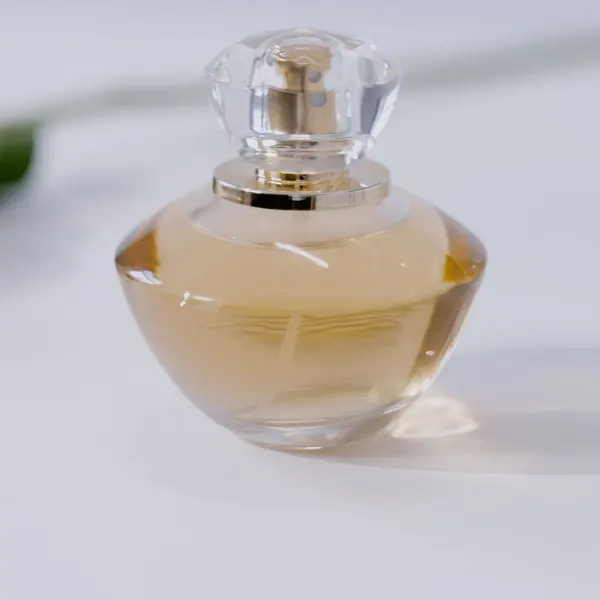 Before
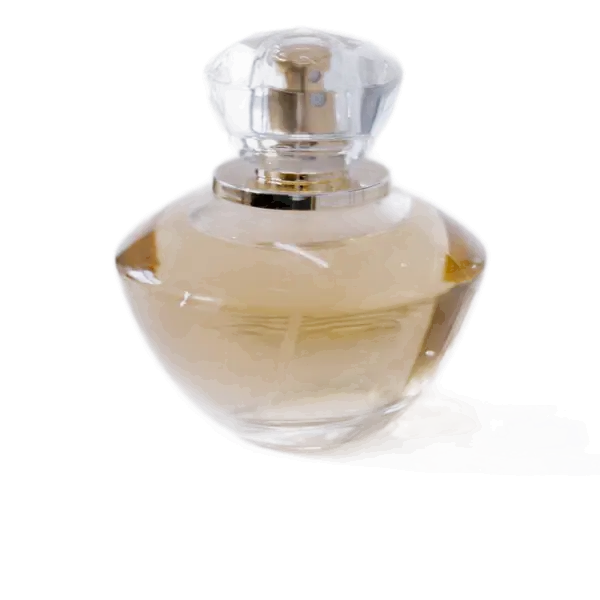 After
AfterIs partial transparency good or bad?
It depends on the new background.
- On white or light gray, it looks right. Real glass on a white sweep shows mostly white through it, which is what the semi-transparent cutout produces. This is the case for Amazon main images and most store listings.
- On black or dark colors, the glass becomes dark and loses its sparkle. Glass products photographed for dark backgrounds are usually lit specially (with light from behind or the sides) to create bright rims; a cutout cannot add that light.
- On saturated colors, the color shows through the bottle and tints it. A clear bottle on bright pink looks pink.
We placed our bottle cutout on white, black, and magenta to check: on white it looked like a normal product shot; on black the glass turned murky and lost its highlights; on magenta the whole body took on a pink tint. On the dark and colored versions, a faint, partly transparent trace of the bottle's reflection on the table also became visible below it, which is invisible on white. On those backgrounds, tighten the edge slightly or erase the trace in a design tool.
If you need a solid look on a colored background, there are two options: shoot the product on a background similar to the final one, or add a white layer behind the bottle in a design tool before placing it on color.
Jewelry: thin parts and tiny details
Rings, earrings, and necklaces bring a different problem: size. A thin chain may be only a few pixels wide even in a large photo, and the model looks at a 1024 × 1024 copy of your image. Details smaller than about one pixel at that size can disappear.
- Fill the frame. Shoot the piece as large as possible, then crop to it before processing. Cropping is the single most effective step for jewelry, because the model then sees the piece at a much higher effective resolution.
- Lay chains in a clear shape on a contrasting surface, without overlapping loops.
- Use the edge slider toward Wider if parts of the chain vanish, and check every link at full size.
- For very fine chains, expect to touch up the cutout in a photo editor, or photograph the chain on a white surface and keep the original background instead of cutting it out.
Chrome, polished metal, and glossy plastic
Mirror-like surfaces reflect whatever is around them: your room, your hands, the phone. A background remover keeps those reflections because they are part of the product's surface. The result can look strange on a clean background, because the reflections no longer match anything around the product.
The fix is in the shoot, not in the cutout:
- Surround the product with white card on both sides and above, so reflections are clean white and gray instead of your room.
- Use soft, diffused light, such as a window with a thin curtain, to avoid hard specular hot spots.
- Shoot from a slightly higher angle so the camera itself is not reflected in the product.
How to shoot product photos for clean cutouts has a simple setup that works for these products too.
Candles, liquids, and frosted glass
Frosted or tinted glass and opaque liquids behave more like solid objects and cut out well. Clear liquids in clear bottles behave like the perfume bottle: mostly semi-transparent. A candle in a clear jar will show the wax as solid and the glass walls as partly see-through, which usually looks right on white.
Recommended settings for these products
| Product | Background to choose | Model setting | Notes |
|---|---|---|---|
| Clear glass bottles and jars | White or light gray | Try 16-bit if edges look rough | Partial transparency looks natural on light backgrounds |
| Rings and earrings | White or light gray | Default | Crop tightly to the piece first |
| Necklaces and fine chains | White | 16-bit | Check every link; widen the edge if links vanish |
| Watches and chrome | White or a light gradient | Default | Fix reflections when shooting |
| Frosted or colored glass | Any | Default | Behaves like a solid object |
For marketplace main images
Amazon and most marketplaces want a pure white background for the main image. Glass products work well with that: the semi-transparent glass picks up the white. Use the Amazon preset in the bulk background remover, check the edge of the bottle on the preview, and add a subtle Ground shadow so the product does not look like it is floating. See Amazon main images with a pure white background.
Summary
Clear glass comes out of a cutout partly transparent, which looks natural on white and light backgrounds but lets strong colors show through. Jewelry needs a tight crop so fine details survive the model's 1024 × 1024 view, and reflective products need clean reflections created at the shoot. For store listings on white, these products cut out well; for dark or colored designs, plan the photo for that background from the start.
Try it on your own photo
Free, no sign-up, and processed on your device. Nothing is uploaded.
Open the background removerRelated guides
- How to shoot product photos for clean cutouts (with just a phone)Online selling
- Why hair, fur, and glass are hard to cut out (and how to get better results)How it works
- Our test results: speed, edge accuracy, and file sizes on six real photosHow it works
- How to make Amazon main images with a pure white backgroundOnline selling