Guides · How it works
Why hair, fur, and glass are hard to cut out (and how to get better results)
The difference between segmentation and matting, why semi-transparent edges like curls, pet fur, and glass bottles challenge every background remover, and practical ways to improve them.
By the developer of ImgCutout · Published · 6 min read
Tested: Soft-edge pixels measured on the 6 example photos with all three model precisions (see our test results).
Look at the before-and-after examples on any background remover's homepage and you will notice they almost always feature curly hair or a fluffy pet. That is not an accident: hair and fur are the hardest things to cut out, so they are the best way to show off. Glass and other transparent objects are hard too, for a different reason. This article explains why, what the tool does about it, and what you can do to get better results.
 Before
 After
AfterSegmentation vs matting
There are two ways to think about separating a subject from its background.
Segmentation asks a yes-or-no question for each pixel: subject or background? It produces a hard mask with crisp edges. That is fine for a product with solid, well-defined outlines, like a box or a shoe.
Matting asks a more subtle question: how much of this pixel is subject? A pixel at the edge of a strand of hair might be 40% hair and 60% sky, because a single strand is thinner than a pixel. The answer is an alpha value between 0 and 255. Matting is what lets hair blend naturally into a new background.
Real photos need matting at the edges. A hard segmentation of curly hair either cuts off all the fine strands (a helmet-like outline) or keeps a block of background around them (a halo). The ormbg model used here outputs soft values, not just zeros and ones, so it behaves more like a matting model at the edges: strands that are partly visible get partial transparency.
Why hair is hard
- Strands are thinner than pixels. At normal resolution, one hair covers part of a pixel. The model has to estimate the mix rather than see the strand.
- Hair is see-through in places. Light passes between strands, so the background is visible through the edge of a hairstyle.
- Hair takes on the background color. Light from a green wall makes the outer strands slightly green. Even when the alpha is right, the color of the edge pixels still contains some of the old background, which shows up as a colored fringe on a new background.
- Hair is irregular. Unlike the edge of a product, there is no simple shape for the model to follow.
Why fur is similar, and sometimes harder
Pet fur has all the issues of hair, plus two more: it often matches the color of the background (a tabby cat on a beige sofa), and long-haired animals have soft outlines with no clear boundary at all. Short-haired dogs with a clear outline are much easier than fluffy cats.
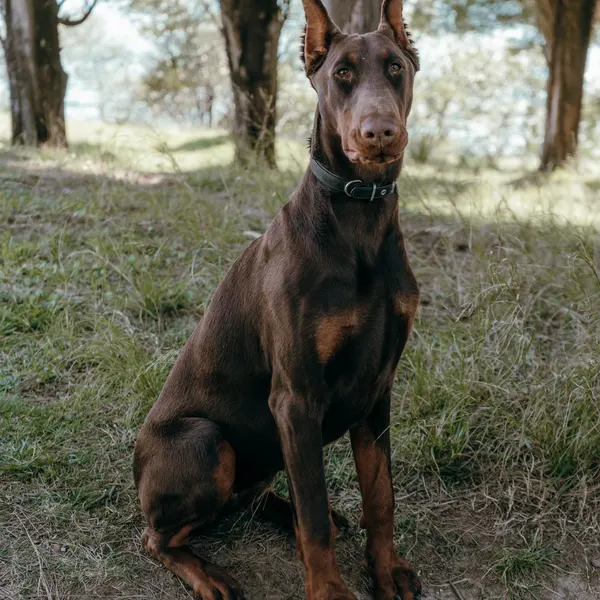 Before
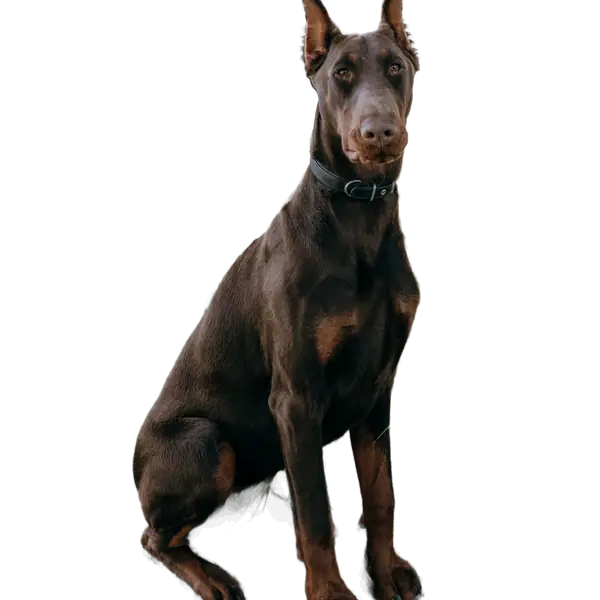 After
AfterWhy glass and transparent objects are hard
Glass has the opposite problem. Its edges are often clear, but the inside is see-through. A model trained to find the main subject has to decide whether the background visible through a glass bottle belongs to the bottle. If it keeps it, the new background will contain a patch of the old one; if it removes it, the glass becomes an empty outline.
In our tests, the model takes a middle path: it renders clear glass as partly transparent. On the perfume bottle in our examples, the metal cap and collar came out fully opaque, while the glass body came out see-through, so a new background shows through it. On a white or light background this looks natural, because real glass on white looks much the same. On a strong color it can surprise you: a bottle placed on bright pink takes on a pink tint. What the model cannot do is reproduce how real glass bends and tints the light behind it, so the effect is an approximation.
What we measured
To see how much each kind of subject depends on soft edges, we counted pixels between 5% and 95% opacity in each example's mask, relative to the size of the subject, and the share of pixels where the default 8-bit model differs visibly from full precision.
| Photo | Soft-edge pixels relative to subject | 8-bit pixels off by more than 32 |
|---|---|---|
| Product photo | 111.8% | 0.073% |
| Pet sticker | 20.5% | 0% |
| Home decor | 15.8% | 0.004% |
| Profile picture | 12.5% | 0% |
| Pet photo | 9.8% | 0.004% |
| Portrait with curly hair | 7.9% | 0.606% |
The glass bottle stands out: it has more semi-transparent pixels than solid ones. Fur and foliage come next. The curly hair portrait has a lower ratio, because the face and body are a large solid area, but it is where the 8-bit model differs most from full precision: in the finest strands. Full details are in our test results.
What you can do
When shooting
- Contrast is everything. Dark hair against a light wall, or light hair against a darker one, gives the model a clear boundary. Hair against a similar-colored background is the most common cause of poor results.
- Use soft, even light. A backlit person (window behind them) has glowing, semi-transparent hair edges that are very hard to separate.
- Use a plain background. Leaves, patterned wallpaper, and busy streets behind hair confuse any model.
- Shoot glass against contrast so its outline is visible: a dark background behind clear glass shows the edges as bright rims.
- Choose the new background for glass with care: white or a light neutral works best, because the glass stays partly see-through. See glass, jewelry, and reflective products.
In the tool
- Use the edge slider. In Settings, "Wider" grows the mask to recover fine strands that were cut off; "Tighter" shrinks it to remove a halo of leftover background. Try small steps (2 to 4 pixels) and compare.
- Try a higher-precision model. In our tests, the 16-bit model matched full precision almost exactly, while the default 8-bit model differed visibly on up to about 0.6% of pixels, almost all of them in fine hair strands and glass. See 8-bit vs 16-bit vs 32-bit.
- Choose a forgiving background. A new background similar in brightness to the old one hides the remaining edge color. Putting dark hair from a white wall onto black is the hardest combination; onto light gray it looks natural.
- Crop closer. A crop that makes the head or pet larger in the frame gives the model more pixels at the edge, because the image is resized to 1024 × 1024 for the model.
- Check at 100% zoom, on both dark and light preview backgrounds, before downloading.
Honest expectations
Even with the best settings, a cutout of complex hair or fur from a busy background will not be perfect at the pixel level. For a profile picture, a social post, or a product listing, the result is usually more than good enough. For a magazine cover or a large print, a professional retoucher still adds value at the edges. If your result is close but not perfect, fixing halos and rough edges covers more techniques.
Summary
Hair, fur, and glass are hard because their edges are partly transparent: the model has to estimate how much of each pixel belongs to the subject, and edge pixels carry color from the old background. Shoot with contrast and a plain background, use the edge slider in small steps, try a higher-precision model for difficult photos, and choose a new background close in brightness to the original.
Try it on your own photo
Free, no sign-up, and processed on your device. Nothing is uploaded.
Open the background remover